Abby in the Commons Workspace
Beyond the per-page chat panel, Abby is deeply integrated into the Commons collaborative workspace — Parthenon's real-time communication hub for research teams.
Commons Architecture
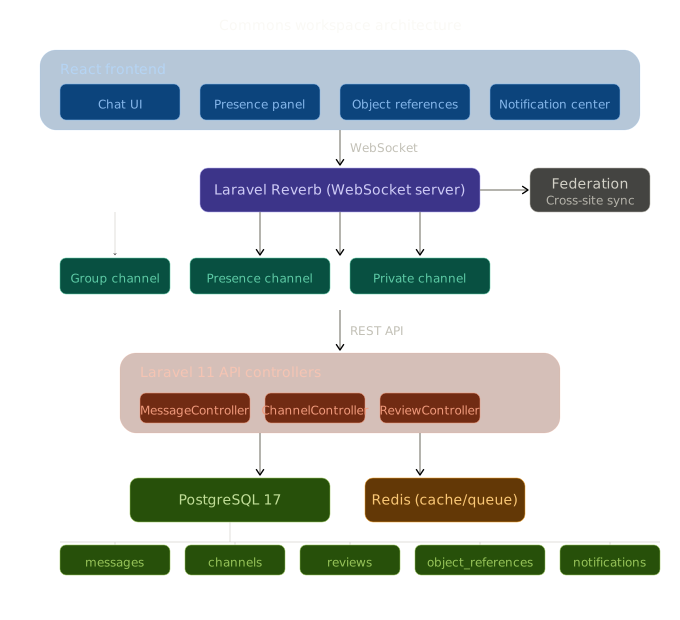
The Commons workspace is a real-time collaborative environment built on Laravel Reverb (WebSocket), Redis, and PostgreSQL. It provides:
- Channel-based messaging with real-time delivery
- Presence system showing who's online
- Object references linking messages to cohorts, studies, concept sets, and analyses
- Emoji reactions and threaded replies
- Announcements and wiki pages for institutional knowledge
Abby is a first-class participant in this environment.
Three Ways to Reach Abby
1. Dedicated #ask-abby Channel
The #ask-abby channel is a dedicated space for research questions. It provides a conversational interface optimized for longer exchanges:
- Full conversation history with scroll-back
- Source attribution showing which documents informed each response
- Feedback buttons (helpful / not helpful) for quality tracking
- Typing indicator showing RAG pipeline stages as Abby processes your question
The dedicated channel uses the AskAbbyChannel component, which manages its own conversation state and provides a richer experience than the page-level chat panel.
2. @Abby Mentions in Any Channel
In any Commons channel, type @Abby followed by your question. The AbbyMentionHandler component detects the mention, extracts the question, and dispatches it to Abby's query service. The response appears inline in the channel conversation, visible to all participants.
This is particularly useful for:
- Asking Abby a question during a team discussion
- Getting a quick vocabulary lookup while reviewing a cohort definition
- Sharing Abby's response with colleagues without switching contexts
3. Page-Level Chat Panel
Every page in Parthenon has Abby's chat panel accessible from the bottom-right corner. This is the primary interface for individual use and carries the full page-aware context.
Component Library
Abby's Commons integration is built from seven composable React components:
AbbyAvatar
The visual identity for Abby across all surfaces. Features an emerald gradient background with optional status indicator (online/typing).
// Example usage
<AbbyAvatar size="md" showStatus />
Sizes: sm (28px), md (36px), lg (48px)
AbbyResponseCard
The primary response renderer. Composes source attribution and feedback into a single card:
- Formatted response text with markdown rendering
- Expandable source panel showing retrieved chunks and relevance scores
- Feedback buttons (helpful / not helpful / detailed categorization)
- Timestamp and response metadata
AbbySourceAttribution
An expandable panel that shows which knowledge sources informed Abby's response:
- Source type badge (docs, research paper, forum, vignette)
- Relevance score (cosine similarity as percentage)
- Truncated chunk preview with expand-on-click
- Source metadata (title, DOI, package name)
AbbyFeedback
Two-stage feedback component:
- Quick feedback: thumbs up / thumbs down
- Detailed feedback: categorized options (incorrect, outdated, unhelpful, missing context)
Feedback is stored and can be used to tune retrieval quality over time.
AbbyTypingIndicator
An animated indicator that shows Abby's RAG pipeline progress:
| Stage | Label | Duration |
|---|---|---|
| 1 | Searching knowledge base... | ~100ms |
| 2 | Reading relevant documents... | ~200ms |
| 3 | Composing response... | 2-8s |
AbbyMentionHandler
Orchestrates @Abby mentions in channel messages:
- Listens for custom
abby-mentionevents - Extracts the question from the mention text
- Dispatches to the query service with channel context
- Broadcasts the response back to the channel
AskAbbyChannel
The dedicated #ask-abby channel component (344 lines). Manages:
- Conversation state with message history
- Query submission and response rendering
- Source attribution display
- Feedback collection
- RAG stage progress animation
API Integration
The Commons integration uses three API endpoints:
// Query Abby
const response = await queryAbby({
  question: "How do I build a cohort for diabetes patients?",
  page_context: "cohort_builder",
  channel_id: "ask-abby",
});

// Submit feedback on a response
await submitFeedback({
  response_id: "abc-123",
  helpful: true,
  category: null,
});

// Fetch conversation history
const history = await fetchAbbyHistory({
  channel_id: "ask-abby",
  limit: 50,
});
Custom Hooks
Three React hooks encapsulate Abby's client-side logic:
useAbbyQuery
Manages query state, RAG stage simulation, and error handling:
const { query, response, isLoading, ragStage, error } = useAbbyQuery();
await query("What negative controls should I use for ACE inhibitors?");
useAbbyFeedback
Wraps feedback submission with optimistic UI updates:
const { submitFeedback, isSubmitting } = useAbbyFeedback();
await submitFeedback(responseId, { helpful: true });
useAbbyMention
Detects @Abby mentions in message text via regex:
const { hasMention, extractQuestion } = useAbbyMention(messageText);
if (hasMention) {
  const question = extractQuestion();
  // dispatch to query service
}
Real-Time Integration
Abby's responses in Commons channels are broadcast via Laravel Reverb WebSocket, meaning:
- All channel participants see Abby's response in real time
- The typing indicator shows while Abby is processing
- Reactions can be added to Abby's responses (same as any message)
- Abby's responses are threaded into the conversation flow naturally
Object References
When Abby references a specific Parthenon object (cohort, concept set, study, analysis), the response can include object reference links that navigate directly to that entity:
- Cohort definitions → Cohort Builder
- Concept sets → Concept Set Builder
- Studies → Study detail page
- Analyses → Characterization/Estimation/Prediction detail pages
This turns Abby from a text-only assistant into a navigational guide that connects knowledge to action.